mirror of
https://github.com/denizsafak/abogen.git
synced 2026-07-18 13:40:27 +02:00
Compare commits
| Author | SHA1 | Date | |
|---|---|---|---|
 Deniz Şafak Deniz Şafak
|
f5d1def330 | ||
|
Deniz Şafak
|
4a28bfb859 | ||
|
Deniz Şafak
|
4adda262c0 | ||
|
Deniz Şafak
|
1d02802172 | ||
|
Deniz Şafak
|
28c0b2c401 | ||
|
Deniz Şafak
|
1e89b566d1 | ||
|
Deniz Şafak
|
ccb350fa08 | ||
|
Deniz Şafak
|
42336145dd | ||
|
Deniz Şafak
|
5d2da7e91c | ||
|
Deniz Şafak
|
e69195e6ef | ||
|
Deniz Şafak
|
1520b971ac | ||
|
Deniz Şafak
|
d426bac87e | ||
|
Deniz Şafak
|
866746c5a1 | ||
|
Deniz ŞafakandGitHub
|
58889d47b0 | ||
|
Deniz Şafak
|
ae148eb591 | ||
|
Deniz Şafak
|
14ed98c316 | ||
|
Deniz Şafak
|
eacbe05934 | ||
|
Маслов Олег
|
e7fb89f137 | ||
|
Deniz Şafak
|
033c809b95 | ||
|
Deniz Şafak
|
f492cc2506 | ||
|
Deniz Şafak
|
495a50f666 | ||
|
Deniz Şafak
|
8c6e292f4f | ||
|
Deniz Şafak
|
1d8cb8eabd | ||
|
Deniz ŞafakandGitHub
|
a3ee95e83f | ||
|
Deniz ŞafakandGitHub
|
a98f75c1a9 | ||
|
Deniz Şafak
|
f4f3a4c207 |
@@ -1,3 +1,19 @@
|
||||
# 1.2.0
|
||||
- Added `Line` option to subtitle generation modes, allowing subtitles to be generated based on line breaks in the text, by @mleg in #94.
|
||||
- Added a loading indicator to the book handler window for better user experience during book preprocessing.
|
||||
- Fixed `cannot access local variable 'is_narrow'` error when subtitle format `SRT` was selected, mentioned by @Kinasa0096 in #88.
|
||||
- Fixed folder and filename sanitization to properly handle OS-specific illegal characters (Windows, Linux, macOS), ensuring compatibility across all platforms when creating chapter folders and files.
|
||||
- Fixed `/` and `\` path display by normalizing paths.
|
||||
- Fixed book reprocessing issue where books were being processed every time the chapters window was opened, improving performance when reopening the same book.
|
||||
- Fixed taskbar icon not appearing correctly in Windows.
|
||||
- Fixed “Go to folder” button not opening the chapter output directory when only separate chapters were generated.
|
||||
- Improvements in code and documentation.
|
||||
|
||||
# 1.1.9
|
||||
- Fixed the issue where spaces were deleted before punctuation marks while generating subtitles.
|
||||
- Fixed markdown TOC generation breaks when "Replace single newlines" is enabled.
|
||||
- Improvements in code and documentation.
|
||||
|
||||
# 1.1.8
|
||||
- Added `.md` (Markdown) file extension support by @brianxiadong in PR #75
|
||||
- Added new option `Configure silence between chapters` that lets you configure the silence between chapters, mentioned by @lfperez1982 in #79
|
||||
|
||||
@@ -7,6 +7,8 @@
|
||||
[](https://github.com/psf/black)
|
||||
[](https://opensource.org/licenses/MIT)
|
||||
|
||||
<a href="https://trendshift.io/repositories/14433" target="_blank"><img src="https://trendshift.io/api/badge/repositories/14433" alt="denizsafak%2Fabogen | Trendshift" style="width: 250px; height: 55px;" width="250" height="55"/></a>
|
||||
|
||||
Abogen is a powerful text-to-speech conversion tool that makes it easy to turn ePub, PDF, text or markdown files into high-quality audio with matching subtitles in seconds. Use it for audiobooks, voiceovers for Instagram, YouTube, TikTok, or any project that needs natural-sounding text-to-speech, using [Kokoro-82M](https://huggingface.co/hexgrad/Kokoro-82M).
|
||||
|
||||
<img title="Abogen Main" src='https://raw.githubusercontent.com/denizsafak/abogen/refs/heads/main/demo/abogen.png' width="380"> <img title="Abogen Processing" src='https://raw.githubusercontent.com/denizsafak/abogen/refs/heads/main/demo/abogen2.png' width="380">
|
||||
@@ -90,11 +92,15 @@ pip3 uninstall torch
|
||||
pip3 install --pre torch torchvision torchaudio --index-url https://download.pytorch.org/whl/nightly/rocm6.4
|
||||
```
|
||||
|
||||
> See [How to fix "CUDA GPU is not available. Using CPU" warning?](#cuda-warning)
|
||||
|
||||
> See [How to fix "WARNING: The script abogen-cli is installed in '/home/username/.local/bin' which is not on PATH" error in Linux?](#path-warning)
|
||||
|
||||
> See [How to fix "No matching distribution found" error?](#no-matching-distribution-found)
|
||||
|
||||
> See [How to fix "CUDA GPU is not available. Using CPU" warning?](#cuda-warning)
|
||||
> See [How to fix "[WinError 1114] A dynamic link library (DLL) initialization routine failed" error?](#WinError-1114)
|
||||
|
||||
> See [How to use "uv" instead of "pip"?](#use-uv-instead-of-pip)
|
||||
|
||||
> Special thanks to [@hg000125](https://github.com/hg000125) for his contribution in [#23](https://github.com/denizsafak/abogen/issues/23). AMD GPU support is possible thanks to his work.
|
||||
|
||||
@@ -132,15 +138,18 @@ Here’s Abogen in action: in this demo, it processes ∼3,000 characters of tex
|
||||
| **Select Voice** | First letter of the language code (e.g., `a` for American English, `b` for British English, etc.), second letter is for `m` for male and `f` for female. |
|
||||
| **Voice mixer** | Create custom voices by mixing different voice models with a profile system. See [Voice Mixer](#voice-mixer) for more details. |
|
||||
| **Voice preview** | Listen to the selected voice before processing. |
|
||||
| **Generate subtitles** | `Disabled`, `Sentence`, `Sentence + Comma`, `Sentence + Highlighting`, `1 word`, `2 words`, `3 words`, etc. (Represents the number of words in each subtitle entry) |
|
||||
| **Generate subtitles** | `Disabled`, `Line`, `Sentence`, `Sentence + Comma`, `Sentence + Highlighting`, `1 word`, `2 words`, `3 words`, etc. (Represents the number of words in each subtitle entry) |
|
||||
| **Output voice format** | `.WAV`, `.FLAC`, `.MP3`, `.OPUS (best compression)` and `M4B (with chapters)` |
|
||||
| **Output subtitle format** | Configures the subtitle format as `SRT (standard)`, `ASS (wide)`, `ASS (narrow)`, `ASS (centered wide)`, or `ASS (centered narrow)`. |
|
||||
| **Replace single newlines with spaces** | Replaces single newlines with spaces in the text. This is useful for texts that have imaginary line breaks. |
|
||||
| **Save location** | `Save next to input file`, `Save to desktop`, or `Choose output folder` |
|
||||
|
||||
> Special thanks to [@brianxiadong](https://github.com/brianxiadong) for adding markdown support in PR [#75](https://github.com/denizsafak/abogen/pull/75)
|
||||
|
||||
> Special thanks to [@jborza](https://github.com/jborza) for chapter support in PR [#10](https://github.com/denizsafak/abogen/pull/10)
|
||||
|
||||
> Special thanks to [@mleg](https://github.com/mleg) for adding `Line` option in subtitle generation in PR [#94](https://github.com/denizsafak/abogen/pull/94)
|
||||
|
||||
| Book handler options | Description |
|
||||
|---------|-------------|
|
||||
| **Chapter Control** | Select specific `chapters` from ePUBs or markdown files or `chapters + pages` from PDFs. |
|
||||
@@ -318,7 +327,19 @@ abogen-cli.exe
|
||||
|
||||
This will start Abogen in command-line mode and display detailed error messages. Please open a new issue on the [Issues](https://github.com/denizsafak/abogen/issues) page with the error message and a description of your problem.
|
||||
|
||||
## `Tips and Solutions`
|
||||
## `Common Issues & Solutions`
|
||||
|
||||
<details><summary><b>
|
||||
<a name="about-abogen">About the name "abogen"</a>
|
||||
</b></summary>
|
||||
|
||||
> The name **"abogen"** comes from a shortened form of **"audiobook generator"**, which is the purpose of this project.
|
||||
>
|
||||
> After releasing the project, I learned from [community feedback](https://news.ycombinator.com/item?id=44853064#44857237) that the prefix *"abo"* can unfortunately be understood as an ethnic slur in certain regions (particularly Australia and New Zealand). This was something I was not aware of when naming the project, as English is not my first language.
|
||||
>
|
||||
> I want to make it clear that the name was chosen only for its technical meaning, with **no offensive intent**. I’m grateful to those who kindly pointed this out, as it helps ensure the project remains respectful and welcoming to everyone.
|
||||
|
||||
</details>
|
||||
|
||||
<details><summary><b>
|
||||
<a name="cuda-warning">How to fix "CUDA GPU is not available. Using CPU" warning?</a>
|
||||
@@ -354,6 +375,22 @@ This will start Abogen in command-line mode and display detailed error messages.
|
||||
|
||||
</details>
|
||||
|
||||
<details><summary><b>
|
||||
<a name="WinError-1114">How to fix "[WinError 1114] A dynamic link library (DLL) initialization routine failed" error?</a>
|
||||
</b></summary>
|
||||
|
||||
> I faced this error when trying to run Abogen in a virtual Windows machine without GPU support. Here's how I fixed it:
|
||||
> If you installed Abogen using the Windows installer `(WINDOWS_INSTALL.bat)`, go to Abogen's folder (that contains `python_embedded`), open your terminal there and run:
|
||||
> ```bash
|
||||
> python_embedded\python.exe -m pip install torch==2.8.0 torchaudio==2.8.0 torchvision==0.23.0
|
||||
> ```
|
||||
> If you installed Abogen using pip, open your terminal in the virtual environment and run:
|
||||
> ```bash
|
||||
> pip install torch==2.8.0 torchaudio==2.8.0 torchvision==0.23.0
|
||||
> ```
|
||||
|
||||
</details>
|
||||
|
||||
<details><summary><b>
|
||||
<a name="japanese-audio-not-working">How to fix Japanese audio not working?</a>
|
||||
</b></summary>
|
||||
@@ -363,6 +400,34 @@ This will start Abogen in command-line mode and display detailed error messages.
|
||||
|
||||
</details>
|
||||
|
||||
<details><summary><b>
|
||||
<a name="use-uv-instead-of-pip">How to use "uv" instead of "pip"?</a>
|
||||
</b></summary>
|
||||
|
||||
> Abogen needs "pip", because Kokoro uses pip to download voice models from HuggingFace Hub. If you want to use "uv" instead of "pip", you can use the following command to run Abogen:
|
||||
>
|
||||
> ```bash
|
||||
> uvx --with pip abogen
|
||||
> ```
|
||||
|
||||
</details>
|
||||
|
||||
<details><summary><b>
|
||||
<a name="use-uv-instead-of-pip">How to uninstall Abogen?</a>
|
||||
</b></summary>
|
||||
|
||||
> - From the settings menu, go to `Open configuration directory` and delete the directory.
|
||||
> - From the settings menu, go to `Open cache directory` and delete the directory.
|
||||
> - If you installed Abogen using pip, type:
|
||||
>```bash
|
||||
>pip uninstall abogen # uninstalls abogen
|
||||
>pip cache purge # removes pip cache
|
||||
>```
|
||||
> - If you installed Abogen using the Windows installer (WINDOWS_INSTALL.bat), just remove the folder that contains Abogen. It installs everything inside `python_embedded` folder, no other directories are created.
|
||||
> - If you installed espeak-ng, you need to remove it separately.
|
||||
|
||||
</details>
|
||||
|
||||
## `Contributing`
|
||||
I welcome contributions! If you have ideas for new features, improvements, or bug fixes, please fork the repository and submit a pull request.
|
||||
### For developers and contributors
|
||||
@@ -387,6 +452,9 @@ Feel free to explore the code and make any changes you like.
|
||||
This project is available under the MIT License - see the [LICENSE](https://github.com/denizsafak/abogen/blob/main/LICENSE) file for details.
|
||||
[Kokoro](https://github.com/hexgrad/kokoro) is licensed under [Apache-2.0](https://github.com/hexgrad/kokoro/blob/main/LICENSE) which allows commercial use, modification, distribution, and private use.
|
||||
|
||||
## `Star History`
|
||||
[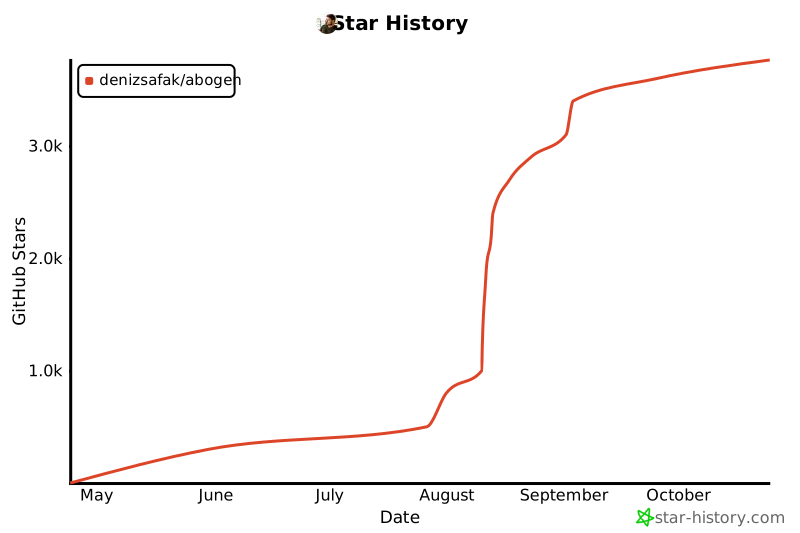](https://www.star-history.com/#denizsafak/abogen&Date)
|
||||
|
||||
> [!IMPORTANT]
|
||||
> Subtitle generation currently works only for English. This is because Kokoro provides timestamp tokens only for English text. If you want subtitles in other languages, please request this feature in the [Kokoro project](https://github.com/hexgrad/kokoro). For more technical details, see [this line](https://github.com/hexgrad/kokoro/blob/6d87f4ae7abc2d14dbc4b3ef2e5f19852e861ac2/kokoro/pipeline.py#L383) in the Kokoro's code.
|
||||
|
||||
|
||||
+2
-2
@@ -139,10 +139,10 @@ if exist "%VERSION_FILE%" (
|
||||
REM Python embedded download configuration for different architectures
|
||||
if "%PROCESSOR_ARCHITECTURE%"=="x86" (
|
||||
set PYTHON_EMBEDDED_FILE=%PROJECTFOLDER%\python_embedded_win32.zip
|
||||
set PYTHON_EMBEDDED_URL=https://github.com/wojiushixiaobai/Python-Embed-Win64/releases/download/3.12.8/python-3.12.8-embed-win32.zip
|
||||
set PYTHON_EMBEDDED_URL=https://github.com/wojiushixiaobai/Python-Embed-Win64/releases/download/3.12.12/python-3.12.12-embed-win32.zip
|
||||
) else (
|
||||
set PYTHON_EMBEDDED_FILE=%PROJECTFOLDER%\python_embedded_amd64.zip
|
||||
set PYTHON_EMBEDDED_URL=https://github.com/wojiushixiaobai/Python-Embed-Win64/releases/download/3.12.8/python-3.12.8-embed-amd64.zip
|
||||
set PYTHON_EMBEDDED_URL=https://github.com/wojiushixiaobai/Python-Embed-Win64/releases/download/3.12.12/python-3.12.12-embed-amd64.zip
|
||||
)
|
||||
|
||||
:: Check if Python exists
|
||||
|
||||
+1
-1
@@ -1 +1 @@
|
||||
1.1.8
|
||||
1.2.0
|
||||
+191
-31
@@ -1,5 +1,4 @@
|
||||
import re
|
||||
import html
|
||||
import ebooklib
|
||||
import base64
|
||||
import fitz # PyMuPDF for PDF support
|
||||
@@ -21,7 +20,7 @@ from PyQt5.QtWidgets import (
|
||||
QMenu,
|
||||
QLabel,
|
||||
)
|
||||
from PyQt5.QtCore import Qt
|
||||
from PyQt5.QtCore import Qt, QThread, pyqtSignal
|
||||
from abogen.utils import clean_text, calculate_text_length, detect_encoding
|
||||
import os
|
||||
import logging # Add logging
|
||||
@@ -41,6 +40,38 @@ class HandlerDialog(QDialog):
|
||||
_merge_chapters_at_end = True
|
||||
_save_as_project = False # New class variable for save_as_project option
|
||||
|
||||
# Cache for processed book content to avoid reprocessing
|
||||
# Key: (book_path, modification_time, file_type)
|
||||
# Value: dict with content_texts, content_lengths, doc_content (for epub), markdown_toc (for markdown)
|
||||
_content_cache = {}
|
||||
|
||||
class _LoaderThread(QThread):
|
||||
"""Minimal QThread that runs a callable and emits an error string on exception."""
|
||||
error = pyqtSignal(str)
|
||||
|
||||
def __init__(self, target_callable):
|
||||
super().__init__()
|
||||
self._target = target_callable
|
||||
|
||||
def run(self):
|
||||
try:
|
||||
self._target()
|
||||
except Exception as e:
|
||||
self.error.emit(str(e))
|
||||
|
||||
@classmethod
|
||||
def clear_content_cache(cls, book_path=None):
|
||||
"""Clear the content cache. If book_path is provided, only clear that book's cache."""
|
||||
if book_path is None:
|
||||
cls._content_cache.clear()
|
||||
logging.info("Cleared all content cache")
|
||||
else:
|
||||
keys_to_remove = [key for key in cls._content_cache.keys() if key[0] == book_path]
|
||||
for key in keys_to_remove:
|
||||
del cls._content_cache[key]
|
||||
if keys_to_remove:
|
||||
logging.info(f"Cleared content cache for {os.path.basename(book_path)}")
|
||||
|
||||
def __init__(self, book_path, file_type=None, checked_chapters=None, parent=None):
|
||||
super().__init__(parent)
|
||||
|
||||
@@ -139,14 +170,11 @@ class HandlerDialog(QDialog):
|
||||
# Initialize checked_chapters set
|
||||
self.checked_chapters = set(checked_chapters) if checked_chapters else set()
|
||||
|
||||
# For storing content and lengths
|
||||
# For storing content and lengths (will be filled by background loader)
|
||||
self.content_texts = {}
|
||||
self.content_lengths = {}
|
||||
|
||||
# Pre-process content based on file type
|
||||
self._preprocess_content()
|
||||
|
||||
# Add "Information" item at the beginning of the tree
|
||||
# Add a placeholder "Information" item so the tree isn't empty immediately
|
||||
info_item = QTreeWidgetItem(self.treeWidget, ["Information"])
|
||||
info_item.setData(0, Qt.UserRole, "info:bookinfo")
|
||||
info_item.setFlags(info_item.flags() & ~Qt.ItemIsUserCheckable)
|
||||
@@ -154,8 +182,18 @@ class HandlerDialog(QDialog):
|
||||
font.setBold(True)
|
||||
info_item.setFont(0, font)
|
||||
|
||||
# Build tree based on file type
|
||||
self._build_tree()
|
||||
# Setup UI now so dialog appears immediately
|
||||
self._setup_ui()
|
||||
|
||||
# Create a centered loading overlay and show it while background load runs
|
||||
self._create_loading_overlay()
|
||||
# Hide the main UI so only the overlay is visible initially
|
||||
if getattr(self, 'splitter', None) is not None:
|
||||
self.splitter.setVisible(False)
|
||||
self._show_loading_overlay("Loading...")
|
||||
|
||||
# Start background loading of book content so the dialog opens immediately
|
||||
self._start_background_load()
|
||||
|
||||
# Hide expand/collapse decoration if there are no parent items
|
||||
has_parents = False
|
||||
@@ -165,30 +203,123 @@ class HandlerDialog(QDialog):
|
||||
break
|
||||
self.treeWidget.setRootIsDecorated(has_parents)
|
||||
|
||||
# Setup UI (creates save_chapters_checkbox and other UI elements)
|
||||
self._setup_ui()
|
||||
|
||||
# Run auto-check after UI is setup
|
||||
if not self._are_provided_checks_relevant():
|
||||
self._run_auto_check()
|
||||
|
||||
# Connect signals
|
||||
self.treeWidget.currentItemChanged.connect(self.update_preview)
|
||||
self.treeWidget.itemChanged.connect(self.handle_item_check)
|
||||
self.treeWidget.itemChanged.connect(lambda _: self._update_checkbox_states())
|
||||
self.treeWidget.itemDoubleClicked.connect(self.handle_item_double_click)
|
||||
def _create_loading_overlay(self):
|
||||
"""Create a simple centered QLabel used as loading indicator.
|
||||
|
||||
# Select first item and expand all
|
||||
self.treeWidget.expandAll()
|
||||
if self.treeWidget.topLevelItemCount() > 0:
|
||||
self.treeWidget.setCurrentItem(self.treeWidget.topLevelItem(0))
|
||||
self.treeWidget.setFocus()
|
||||
This label is added to the dialog's main layout above the splitter so
|
||||
when the splitter is hidden only the text is visible.
|
||||
"""
|
||||
try:
|
||||
label = QLabel(self)
|
||||
label.setAlignment(Qt.AlignCenter)
|
||||
# larger plain text per request
|
||||
label.setStyleSheet("font-size: 14pt;")
|
||||
label.setVisible(False)
|
||||
# insert at top of main layout if present, otherwise keep as child
|
||||
try:
|
||||
layout = self.layout()
|
||||
if layout is not None:
|
||||
layout.insertWidget(0, label)
|
||||
except Exception:
|
||||
pass
|
||||
self._loading_label = label
|
||||
except Exception:
|
||||
self._loading_label = None
|
||||
|
||||
# Update checkbox states
|
||||
self._update_checkbox_states()
|
||||
def _show_loading_overlay(self, text: str):
|
||||
lbl = getattr(self, '_loading_label', None)
|
||||
if lbl is None:
|
||||
return
|
||||
lbl.setText(text)
|
||||
lbl.setVisible(True)
|
||||
|
||||
def _hide_loading_overlay(self):
|
||||
lbl = getattr(self, '_loading_label', None)
|
||||
if lbl is None:
|
||||
return
|
||||
lbl.setVisible(False)
|
||||
|
||||
|
||||
def _start_background_load(self):
|
||||
"""Start a QThread that runs the preprocessing in background."""
|
||||
# Start a minimal QThread which executes _preprocess_content
|
||||
self._loader_thread = HandlerDialog._LoaderThread(self._preprocess_content)
|
||||
self._loader_thread.finished.connect(self._on_load_finished)
|
||||
self._loader_thread.error.connect(self._on_load_error)
|
||||
# ensure thread instance is deleted when done
|
||||
self._loader_thread.finished.connect(self._loader_thread.deleteLater)
|
||||
self._loader_thread.start()
|
||||
|
||||
def _on_load_error(self, err_msg):
|
||||
logging.error(f"Error loading book in background: {err_msg}")
|
||||
if getattr(self, 'previewEdit', None) is not None:
|
||||
self.previewEdit.setPlainText(f"Error loading book: {err_msg}")
|
||||
if getattr(self, 'splitter', None) is not None:
|
||||
self.splitter.setVisible(True)
|
||||
self._hide_loading_overlay()
|
||||
|
||||
def _on_load_finished(self):
|
||||
"""Called in the main thread when background loading finished."""
|
||||
# Build the tree now that content_texts/content_lengths/etc. are ready
|
||||
try:
|
||||
# Rebuild tree based on file type
|
||||
self._build_tree()
|
||||
|
||||
# Run auto-check if no provided checks are relevant
|
||||
if not self._are_provided_checks_relevant():
|
||||
self._run_auto_check()
|
||||
|
||||
# Connect signals (after tree exists)
|
||||
self.treeWidget.currentItemChanged.connect(self.update_preview)
|
||||
self.treeWidget.itemChanged.connect(self.handle_item_check)
|
||||
self.treeWidget.itemChanged.connect(lambda _: self._update_checkbox_states())
|
||||
self.treeWidget.itemDoubleClicked.connect(self.handle_item_double_click)
|
||||
|
||||
# Expand and select first item
|
||||
self.treeWidget.expandAll()
|
||||
if self.treeWidget.topLevelItemCount() > 0:
|
||||
self.treeWidget.setCurrentItem(self.treeWidget.topLevelItem(0))
|
||||
self.treeWidget.setFocus()
|
||||
|
||||
# Update checkbox states
|
||||
self._update_checkbox_states()
|
||||
|
||||
# Update preview for the current selection
|
||||
current = self.treeWidget.currentItem()
|
||||
self.update_preview(current)
|
||||
|
||||
except Exception as e:
|
||||
logging.error(f"Error finalizing book load: {e}")
|
||||
# Show the main UI and hide loading text
|
||||
if getattr(self, 'splitter', None) is not None:
|
||||
self.splitter.setVisible(True)
|
||||
self._hide_loading_overlay()
|
||||
|
||||
def _preprocess_content(self):
|
||||
"""Pre-process content from the document"""
|
||||
# Create cache key from file path, modification time, and file type
|
||||
try:
|
||||
mod_time = os.path.getmtime(self.book_path)
|
||||
except Exception:
|
||||
mod_time = 0
|
||||
|
||||
cache_key = (self.book_path, mod_time, self.file_type)
|
||||
|
||||
# Check if content is already cached
|
||||
if cache_key in HandlerDialog._content_cache:
|
||||
cached_data = HandlerDialog._content_cache[cache_key]
|
||||
self.content_texts = cached_data['content_texts']
|
||||
self.content_lengths = cached_data['content_lengths']
|
||||
if 'doc_content' in cached_data:
|
||||
self.doc_content = cached_data['doc_content']
|
||||
if 'markdown_toc' in cached_data:
|
||||
self.markdown_toc = cached_data['markdown_toc']
|
||||
logging.info(f"Using cached content for {os.path.basename(self.book_path)}")
|
||||
return
|
||||
|
||||
# Process content if not cached
|
||||
if self.file_type == "epub":
|
||||
try:
|
||||
self._process_epub_content_nav() # Use the new navigation-based method
|
||||
@@ -204,6 +335,19 @@ class HandlerDialog(QDialog):
|
||||
else:
|
||||
self._preprocess_pdf_content()
|
||||
|
||||
# Cache the processed content
|
||||
cache_data = {
|
||||
'content_texts': self.content_texts,
|
||||
'content_lengths': self.content_lengths,
|
||||
}
|
||||
if hasattr(self, 'doc_content'):
|
||||
cache_data['doc_content'] = self.doc_content
|
||||
if hasattr(self, 'markdown_toc'):
|
||||
cache_data['markdown_toc'] = self.markdown_toc
|
||||
|
||||
HandlerDialog._content_cache[cache_key] = cache_data
|
||||
logging.info(f"Cached content for {os.path.basename(self.book_path)}")
|
||||
|
||||
def _preprocess_pdf_content(self):
|
||||
"""Pre-process all page contents from PDF document"""
|
||||
for page_num in range(len(self.pdf_doc)):
|
||||
@@ -231,20 +375,24 @@ class HandlerDialog(QDialog):
|
||||
if not self.markdown_text:
|
||||
return
|
||||
|
||||
text = clean_text(self.markdown_text)
|
||||
text = textwrap.dedent(text)
|
||||
# Generate TOC from the original (dedented) markdown BEFORE cleaning,
|
||||
# so header ids/anchors are preserved for reliable position detection.
|
||||
original_text = textwrap.dedent(self.markdown_text)
|
||||
md = markdown.Markdown(extensions=['toc', 'fenced_code'])
|
||||
html = md.convert(text)
|
||||
html = md.convert(original_text)
|
||||
self.markdown_toc = md.toc_tokens
|
||||
|
||||
# Use cleaned text for stored content/length calculations
|
||||
cleaned_full_text = clean_text(original_text)
|
||||
|
||||
soup = BeautifulSoup(html, 'html.parser')
|
||||
self.content_texts = {}
|
||||
self.content_lengths = {}
|
||||
|
||||
if not self.markdown_toc:
|
||||
chapter_id = "markdown_content"
|
||||
self.content_texts[chapter_id] = text
|
||||
self.content_lengths[chapter_id] = calculate_text_length(text)
|
||||
self.content_texts[chapter_id] = cleaned_full_text
|
||||
self.content_lengths[chapter_id] = calculate_text_length(cleaned_full_text)
|
||||
return
|
||||
|
||||
all_headers = []
|
||||
@@ -279,6 +427,7 @@ class HandlerDialog(QDialog):
|
||||
header_tag = section_soup.find(attrs={'id': header_id})
|
||||
if header_tag:
|
||||
header_tag.decompose()
|
||||
# Clean section text for storage/lengths
|
||||
section_text = clean_text(section_soup.get_text()).strip()
|
||||
chapter_id = header_id
|
||||
if section_text:
|
||||
@@ -1901,6 +2050,17 @@ class HandlerDialog(QDialog):
|
||||
return metadata
|
||||
|
||||
def get_selected_text(self):
|
||||
# If a background loader thread is running, wait for it to finish to
|
||||
# preserve compatibility with callers that expect content to be ready
|
||||
# when they create a HandlerDialog and immediately request selected text.
|
||||
try:
|
||||
if hasattr(self, '_loader_thread') and getattr(self, '_loader_thread') is not None:
|
||||
# Wait for thread to finish (blocks until done)
|
||||
if self._loader_thread.isRunning():
|
||||
self._loader_thread.wait()
|
||||
except Exception:
|
||||
pass
|
||||
|
||||
if self.file_type == "epub":
|
||||
return self._get_epub_selected_text()
|
||||
elif self.file_type == "markdown":
|
||||
|
||||
+113
-42
@@ -28,6 +28,66 @@ def get_sample_voice_text(lang_code):
|
||||
return SAMPLE_VOICE_TEXTS.get(lang_code, SAMPLE_VOICE_TEXTS["a"])
|
||||
|
||||
|
||||
def sanitize_name_for_os(name, is_folder=True):
|
||||
"""
|
||||
Sanitize a filename or folder name based on the operating system.
|
||||
|
||||
Args:
|
||||
name: The name to sanitize
|
||||
is_folder: Whether this is a folder name (default: True)
|
||||
|
||||
Returns:
|
||||
Sanitized name safe for the current OS
|
||||
"""
|
||||
if not name:
|
||||
return "audiobook"
|
||||
|
||||
system = platform.system()
|
||||
|
||||
if system == "Windows":
|
||||
# Windows illegal characters: < > : " / \ | ? *
|
||||
# Also can't end with space or dot
|
||||
sanitized = re.sub(r'[<>:"/\\|?*]', '_', name)
|
||||
# Remove control characters (0-31)
|
||||
sanitized = re.sub(r'[\x00-\x1f]', '_', sanitized)
|
||||
# Remove trailing spaces and dots
|
||||
sanitized = sanitized.rstrip('. ')
|
||||
# Windows reserved names (CON, PRN, AUX, NUL, COM1-9, LPT1-9)
|
||||
reserved = ['CON', 'PRN', 'AUX', 'NUL'] + \
|
||||
[f'COM{i}' for i in range(1, 10)] + \
|
||||
[f'LPT{i}' for i in range(1, 10)]
|
||||
if sanitized.upper() in reserved or sanitized.upper().split('.')[0] in reserved:
|
||||
sanitized = f"_{sanitized}"
|
||||
elif system == "Darwin": # macOS
|
||||
# macOS illegal characters: : (colon is converted to / by the system)
|
||||
# Also can't start with dot (hidden file) for folders typically
|
||||
sanitized = re.sub(r'[:]', '_', name)
|
||||
# Remove control characters
|
||||
sanitized = re.sub(r'[\x00-\x1f]', '_', sanitized)
|
||||
# Avoid leading dot for folders (creates hidden folders)
|
||||
if is_folder and sanitized.startswith('.'):
|
||||
sanitized = '_' + sanitized[1:]
|
||||
else: # Linux and others
|
||||
# Linux illegal characters: / and null character
|
||||
# Though / is illegal, most other chars are technically allowed
|
||||
sanitized = re.sub(r'[/\x00]', '_', name)
|
||||
# Remove other control characters for safety
|
||||
sanitized = re.sub(r'[\x01-\x1f]', '_', sanitized)
|
||||
# Avoid leading dot for folders (creates hidden folders)
|
||||
if is_folder and sanitized.startswith('.'):
|
||||
sanitized = '_' + sanitized[1:]
|
||||
|
||||
# Ensure the name is not empty after sanitization
|
||||
if not sanitized or sanitized.strip() == '':
|
||||
sanitized = "audiobook"
|
||||
|
||||
# Limit length to 255 characters (common limit across filesystems)
|
||||
if len(sanitized) > 255:
|
||||
sanitized = sanitized[:255].rstrip('. ')
|
||||
|
||||
return sanitized
|
||||
|
||||
|
||||
class ChapterOptionsDialog(QDialog):
|
||||
def __init__(self, chapter_count, parent=None):
|
||||
super().__init__(parent)
|
||||
@@ -248,6 +308,10 @@ class ConversionThread(QThread):
|
||||
input_file = self.display_path if self.display_path else self.file_name
|
||||
processing_file = self.file_name
|
||||
|
||||
# Normalize paths for consistent display (fixes Windows path separator issues)
|
||||
input_file = os.path.normpath(input_file) if input_file else input_file
|
||||
processing_file = os.path.normpath(processing_file) if processing_file else processing_file
|
||||
|
||||
self.log_updated.emit(f"- Input File: {input_file}")
|
||||
if input_file != processing_file:
|
||||
self.log_updated.emit(f"- Processing File: {processing_file}")
|
||||
@@ -417,6 +481,9 @@ class ConversionThread(QThread):
|
||||
base_path = self.display_path if self.display_path else self.file_name
|
||||
|
||||
base_name = os.path.splitext(os.path.basename(base_path))[0]
|
||||
# Sanitize base_name for folder/file creation based on OS
|
||||
sanitized_base_name = sanitize_name_for_os(base_name, is_folder=True)
|
||||
|
||||
if self.save_option == "Save to Desktop":
|
||||
parent_dir = user_desktop_dir()
|
||||
elif self.save_option == "Save next to input file":
|
||||
@@ -437,11 +504,11 @@ class ConversionThread(QThread):
|
||||
while True:
|
||||
suffix = f"_{counter}" if counter > 1 else ""
|
||||
chapters_out_dir_candidate = os.path.join(
|
||||
parent_dir, f"{base_name}{suffix}_chapters"
|
||||
parent_dir, f"{sanitized_base_name}{suffix}_chapters"
|
||||
)
|
||||
# Only check for files with allowed extensions (extension without dot, case-insensitive)
|
||||
clash = any(
|
||||
os.path.splitext(fname)[0] == f"{base_name}{suffix}"
|
||||
os.path.splitext(fname)[0] == f"{sanitized_base_name}{suffix}"
|
||||
and os.path.splitext(fname)[1][1:].lower() in allowed_exts
|
||||
for fname in os.listdir(parent_dir)
|
||||
)
|
||||
@@ -461,7 +528,7 @@ class ConversionThread(QThread):
|
||||
# Prepare merged output file for incremental writing ONLY if merge_chapters_at_end is True
|
||||
if merge_chapters_at_end:
|
||||
out_dir = parent_dir
|
||||
base_filepath_no_ext = os.path.join(out_dir, f"{base_name}{suffix}")
|
||||
base_filepath_no_ext = os.path.join(out_dir, f"{sanitized_base_name}{suffix}")
|
||||
merged_out_path = f"{base_filepath_no_ext}.{self.output_format}"
|
||||
subtitle_entries = []
|
||||
current_time = 0.0
|
||||
@@ -554,6 +621,13 @@ class ConversionThread(QThread):
|
||||
merged_subtitle_path = (
|
||||
os.path.splitext(merged_out_path)[0] + f".{file_extension}"
|
||||
)
|
||||
# Default subtitle layout flags/strings so they exist regardless
|
||||
# of whether ASS-specific handling runs. This prevents runtime
|
||||
# errors when non-ASS formats (like SRT) are selected.
|
||||
is_centered = False
|
||||
is_narrow = False
|
||||
merged_subtitle_margin = ""
|
||||
merged_subtitle_alignment_tag = ""
|
||||
if "ass" in subtitle_format:
|
||||
merged_subtitle_file = open(
|
||||
merged_subtitle_path,
|
||||
@@ -644,8 +718,13 @@ class ConversionThread(QThread):
|
||||
loaded_voice = self.voice
|
||||
# Prepare per-chapter output file if needed
|
||||
if save_chapters_separately and total_chapters > 1:
|
||||
# First pass: keep alphanumeric, spaces, hyphens, and underscores
|
||||
sanitized = re.sub(r"[^\w\s\-]", "", chapter_name)
|
||||
# Replace multiple spaces/hyphens with single underscore
|
||||
sanitized = re.sub(r"[\s\-]+", "_", sanitized).strip("_")
|
||||
# Apply OS-specific sanitization
|
||||
sanitized = sanitize_name_for_os(sanitized, is_folder=False)
|
||||
# Limit length (leaving room for the chapter number prefix)
|
||||
MAX_LEN = 80
|
||||
if len(sanitized) > MAX_LEN:
|
||||
pos = sanitized[:MAX_LEN].rfind("_")
|
||||
@@ -705,13 +784,20 @@ class ConversionThread(QThread):
|
||||
chapter_subtitle_path = os.path.join(
|
||||
chapters_out_dir, f"{chapter_filename}.{file_extension}"
|
||||
)
|
||||
# Ensure these variables exist even when not using ASS so
|
||||
# later code can safely reference them.
|
||||
is_centered = False
|
||||
is_narrow = False
|
||||
chapter_subtitle_margin = ""
|
||||
chapter_subtitle_alignment_tag = ""
|
||||
# Open the chapter subtitle file for writing for both SRT and ASS
|
||||
chapter_subtitle_file = open(
|
||||
chapter_subtitle_path,
|
||||
"w",
|
||||
encoding="utf-8",
|
||||
errors="replace",
|
||||
)
|
||||
if "ass" in subtitle_format:
|
||||
chapter_subtitle_file = open(
|
||||
chapter_subtitle_path,
|
||||
"w",
|
||||
encoding="utf-8",
|
||||
errors="replace",
|
||||
)
|
||||
# Minimal ASS header
|
||||
chapter_subtitle_file.write("[Script Info]\n")
|
||||
chapter_subtitle_file.write("Title: Generated by Abogen\n")
|
||||
@@ -734,18 +820,13 @@ class ConversionThread(QThread):
|
||||
is_narrow = subtitle_format in (
|
||||
"ass_narrow",
|
||||
"ass_centered_narrow",
|
||||
)
|
||||
chapter_subtitle_margin = "90" if is_narrow else ""
|
||||
chapter_subtitle_alignment_tag = (
|
||||
f"{{\\an5}}" if is_centered else ""
|
||||
)
|
||||
)
|
||||
chapter_subtitle_margin = "90" if is_narrow else ""
|
||||
chapter_subtitle_alignment_tag = (
|
||||
f"{{\\an5}}" if is_centered else ""
|
||||
)
|
||||
else:
|
||||
chapter_subtitle_file = open(
|
||||
chapter_subtitle_path,
|
||||
"w",
|
||||
encoding="utf-8",
|
||||
errors="replace",
|
||||
)
|
||||
chapter_subtitle_file = None
|
||||
else:
|
||||
chapter_subtitle_path = None
|
||||
chapter_subtitle_file = None
|
||||
@@ -1036,11 +1117,12 @@ class ConversionThread(QThread):
|
||||
merged_out_path,
|
||||
)
|
||||
else:
|
||||
# If not merging, just finish after chapters
|
||||
# If not merging, report the folder that holds the chapter files
|
||||
self.progress_updated.emit(100, "00:00:00")
|
||||
chapters_dir = os.path.abspath(chapters_out_dir or parent_dir)
|
||||
self.conversion_finished.emit(
|
||||
("\nAll chapters saved.", "green"),
|
||||
None,
|
||||
(f"\nAll chapters saved to: {chapters_dir}", "green"),
|
||||
chapters_dir,
|
||||
)
|
||||
except Exception as e:
|
||||
# Cleanup ffmpeg subprocesses on error
|
||||
@@ -1189,23 +1271,7 @@ class ConversionThread(QThread):
|
||||
if not tokens_with_timestamps:
|
||||
return
|
||||
|
||||
# Always combine punctuation with preceding words for consistent handling across modes
|
||||
processed_tokens = []
|
||||
i = 0
|
||||
while i < len(tokens_with_timestamps):
|
||||
token = tokens_with_timestamps[i].copy()
|
||||
|
||||
# Look ahead for punctuation
|
||||
while i + 1 < len(tokens_with_timestamps) and re.match(
|
||||
r"^[^\w\s]+$", tokens_with_timestamps[i + 1]["text"]
|
||||
):
|
||||
token["text"] += tokens_with_timestamps[i + 1]["text"]
|
||||
token["end"] = tokens_with_timestamps[i + 1]["end"]
|
||||
token["whitespace"] = tokens_with_timestamps[i + 1]["whitespace"]
|
||||
i += 1
|
||||
|
||||
processed_tokens.append(token)
|
||||
i += 1
|
||||
processed_tokens = tokens_with_timestamps # Use tokens directly
|
||||
|
||||
# Use processed_tokens instead of tokens_with_timestamps for the rest of the method
|
||||
if self.subtitle_mode == "Sentence + Highlighting":
|
||||
@@ -1262,9 +1328,14 @@ class ConversionThread(QThread):
|
||||
if end is None or end <= start or end <= 0:
|
||||
subtitle_entries[-1] = (start, fallback_end_time, text)
|
||||
|
||||
elif self.subtitle_mode == "Sentence" or self.subtitle_mode == "Sentence + Comma":
|
||||
elif self.subtitle_mode in ["Sentence", "Sentence + Comma", "Line"]:
|
||||
# Define separator pattern based on mode
|
||||
separator = r"[.!?]" if self.subtitle_mode == "Sentence" else r"[.!?,]"
|
||||
if self.subtitle_mode == "Line":
|
||||
separator = r"\n"
|
||||
elif self.subtitle_mode == "Sentence":
|
||||
separator = r"[.!?]"
|
||||
else: # Sentence + Comma
|
||||
separator = r"[.!?,]"
|
||||
current_sentence = []
|
||||
word_count = 0
|
||||
|
||||
|
||||
+57
-35
@@ -85,7 +85,6 @@ from abogen.voice_profiles import load_profiles
|
||||
# Import ctypes for Windows-specific taskbar icon
|
||||
if platform.system() == "Windows":
|
||||
import ctypes
|
||||
import winreg
|
||||
|
||||
|
||||
class DarkTitleBarEventFilter(QObject):
|
||||
@@ -231,6 +230,8 @@ class InputBox(QLabel):
|
||||
size_str = self._human_readable_size(os.path.getsize(file_path))
|
||||
name = os.path.basename(file_path)
|
||||
char_count = 0
|
||||
window = self.window()
|
||||
cache = getattr(window, "_char_count_cache", None)
|
||||
|
||||
def parse_size(size_str):
|
||||
# Use regex to extract the numeric part
|
||||
@@ -250,40 +251,49 @@ class InputBox(QLabel):
|
||||
except Exception:
|
||||
return str(n)
|
||||
|
||||
if (
|
||||
file_path.lower().endswith(".epub")
|
||||
or file_path.lower().endswith(".pdf")
|
||||
or file_path.lower().endswith((".md", ".markdown"))
|
||||
) and hasattr(self.window(), "selected_chapters"):
|
||||
# EPUB, PDF, or Markdown: sum character counts for selected chapters
|
||||
try:
|
||||
doc_extensions = (".epub", ".pdf", ".md", ".markdown")
|
||||
char_source_path = file_path
|
||||
cached_char_count = None
|
||||
|
||||
book_path = file_path
|
||||
dialog = HandlerDialog(
|
||||
book_path,
|
||||
checked_chapters=self.window().selected_chapters,
|
||||
parent=self.window(),
|
||||
)
|
||||
chapters_text, all_checked_hrefs = dialog.get_selected_text()
|
||||
# Clean text before counting characters
|
||||
cleaned_text = clean_text(chapters_text)
|
||||
char_count = calculate_text_length(cleaned_text)
|
||||
except Exception:
|
||||
char_count = "N/A"
|
||||
else:
|
||||
if file_path.lower().endswith(doc_extensions):
|
||||
selected_file_path = getattr(window, "selected_file", None)
|
||||
if selected_file_path and os.path.exists(selected_file_path):
|
||||
char_source_path = selected_file_path
|
||||
else:
|
||||
char_source_path = None
|
||||
|
||||
if cache is not None:
|
||||
cached_char_count = cache.get(file_path)
|
||||
if (
|
||||
cached_char_count is None
|
||||
and char_source_path
|
||||
and char_source_path != file_path
|
||||
):
|
||||
cached_char_count = cache.get(char_source_path)
|
||||
|
||||
if cached_char_count is not None:
|
||||
char_count = cached_char_count
|
||||
elif char_source_path:
|
||||
try:
|
||||
with open(file_path, "r", encoding="utf-8", errors="ignore") as f:
|
||||
with open(char_source_path, "r", encoding="utf-8", errors="ignore") as f:
|
||||
text = f.read()
|
||||
# Clean text before counting characters
|
||||
cleaned_text = clean_text(text)
|
||||
char_count = calculate_text_length(cleaned_text)
|
||||
except Exception:
|
||||
char_count = "N/A"
|
||||
else:
|
||||
char_count = "N/A"
|
||||
|
||||
if cache is not None and isinstance(char_count, int):
|
||||
cache[file_path] = char_count
|
||||
if char_source_path and char_source_path != file_path:
|
||||
cache[char_source_path] = char_count
|
||||
|
||||
# Store numeric char_count on window
|
||||
try:
|
||||
self.window().char_count = int(char_count)
|
||||
window.char_count = int(char_count)
|
||||
except Exception:
|
||||
self.window().char_count = 0
|
||||
window.char_count = 0
|
||||
# embed icon at native size with word-wrap for the filename
|
||||
self.setText(
|
||||
f'<img src="data:image/png;base64,{img_data}"><br><span style="display: inline-block; max-width: 100%; word-break: break-all;"><b>{name}</b></span><br>Size: {size_str}<br>Characters: {format_num(char_count)}'
|
||||
@@ -294,11 +304,11 @@ class InputBox(QLabel):
|
||||
f"QLabel {{ {self.STYLE_ACTIVE} }} QLabel:hover {{ {self.STYLE_ACTIVE_HOVER} }}"
|
||||
)
|
||||
self.clear_btn.show()
|
||||
is_document = self.window().selected_file_type in ["epub", "pdf", "md", "markdown"]
|
||||
is_document = window.selected_file_type in ["epub", "pdf", "md", "markdown"]
|
||||
self.chapters_btn.setVisible(is_document)
|
||||
if is_document:
|
||||
chapter_count = len(self.window().selected_chapters)
|
||||
file_type = self.window().selected_file_type
|
||||
chapter_count = len(window.selected_chapters)
|
||||
file_type = window.selected_file_type
|
||||
# Adjust button text based on file type
|
||||
if file_type == "epub" or file_type == "md" or file_type == "markdown":
|
||||
self.chapters_btn.setText(f"Chapters ({chapter_count})")
|
||||
@@ -313,8 +323,8 @@ class InputBox(QLabel):
|
||||
|
||||
# For epub/pdf files, show edit if we have a selected_file (temp txt)
|
||||
if (
|
||||
self.window().selected_file_type in ["epub", "pdf", "md", "markdown", "md", "markdown"]
|
||||
and self.window().selected_file
|
||||
window.selected_file_type in ["epub", "pdf", "md", "markdown", "md", "markdown"]
|
||||
and window.selected_file
|
||||
):
|
||||
should_show_edit = True
|
||||
|
||||
@@ -322,13 +332,13 @@ class InputBox(QLabel):
|
||||
self.go_to_folder_btn.show()
|
||||
# Enable add to queue button only when file is accepted (input box is green)
|
||||
self.resizeEvent(None)
|
||||
if hasattr(self.window(), "btn_add_to_queue"):
|
||||
self.window().btn_add_to_queue.setEnabled(True)
|
||||
if hasattr(window, "btn_add_to_queue"):
|
||||
window.btn_add_to_queue.setEnabled(True)
|
||||
|
||||
self.chapters_btn.adjustSize()
|
||||
# Reset the input_box_cleared_by_queue flag after setting file info
|
||||
if hasattr(self.window(), "input_box_cleared_by_queue"):
|
||||
self.window().input_box_cleared_by_queue = False
|
||||
if hasattr(window, "input_box_cleared_by_queue"):
|
||||
window.input_box_cleared_by_queue = False
|
||||
|
||||
def set_error(self, message):
|
||||
self.setText(message)
|
||||
@@ -721,6 +731,8 @@ class abogen(QWidget):
|
||||
self.selected_chapters = set()
|
||||
self.last_opened_book_path = None # Track the last opened book path
|
||||
self.last_output_path = None
|
||||
self.char_count = 0
|
||||
self._char_count_cache = {}
|
||||
# Only one of selected_profile_name or selected_voice should be set
|
||||
self.selected_profile_name = self.config.get("selected_profile_name")
|
||||
self.selected_voice = None
|
||||
@@ -953,6 +965,7 @@ class abogen(QWidget):
|
||||
self.subtitle_combo.setToolTip(
|
||||
"Choose how subtitles will be generated:\n"
|
||||
"Disabled: No subtitles will be generated.\n"
|
||||
"Line: Subtitles will be generated for each line.\n"
|
||||
"Sentence: Subtitles will be generated for each sentence.\n"
|
||||
"Sentence + Comma: Subtitles will be generated for each sentence and comma.\n"
|
||||
"Sentence + Highlighting: Subtitles with word-by-word karaoke highlighting.\n"
|
||||
@@ -963,7 +976,7 @@ class abogen(QWidget):
|
||||
for lang in SUPPORTED_LANGUAGES_FOR_SUBTITLE_GENERATION
|
||||
)
|
||||
)
|
||||
subtitle_options = ["Disabled", "Sentence", "Sentence + Comma", "Sentence + Highlighting"] + [
|
||||
subtitle_options = ["Disabled", "Line", "Sentence", "Sentence + Comma", "Sentence + Highlighting"] + [
|
||||
f"{i} word" if i == 1 else f"{i} words" for i in range(1, 11)
|
||||
]
|
||||
self.subtitle_combo.addItems(subtitle_options)
|
||||
@@ -1254,6 +1267,7 @@ class abogen(QWidget):
|
||||
self.selected_chapters = set()
|
||||
self.last_opened_book_path = book_path
|
||||
|
||||
# HandlerDialog uses internal caching to avoid reprocessing the same book
|
||||
dialog = HandlerDialog(
|
||||
book_path,
|
||||
file_type=getattr(self, 'selected_file_type', None),
|
||||
@@ -1292,6 +1306,12 @@ class abogen(QWidget):
|
||||
if book_path.lower().endswith(".pdf"):
|
||||
self.pdf_has_bookmarks = getattr(dialog, "has_pdf_bookmarks", False)
|
||||
|
||||
cleaned_text = clean_text(chapters_text)
|
||||
computed_char_count = calculate_text_length(cleaned_text)
|
||||
self.char_count = computed_char_count
|
||||
if isinstance(getattr(self, "_char_count_cache", None), dict):
|
||||
self._char_count_cache[book_path] = computed_char_count
|
||||
|
||||
# Use "abogen" prefix for cache files
|
||||
# Extract base name without extension
|
||||
base_name = os.path.splitext(os.path.basename(book_path))[0]
|
||||
@@ -1376,6 +1396,8 @@ class abogen(QWidget):
|
||||
self.selected_file = tmp
|
||||
self.selected_book_path = book_path
|
||||
self.displayed_file_path = book_path
|
||||
if isinstance(getattr(self, "_char_count_cache", None), dict):
|
||||
self._char_count_cache[tmp] = computed_char_count
|
||||
# Only set file info if dialog was accepted
|
||||
self.input_box.set_file_info(book_path)
|
||||
return True
|
||||
|
||||
+14
-8
@@ -9,7 +9,10 @@ import signal
|
||||
try:
|
||||
from PyQt5.QtCore import QLibraryInfo
|
||||
plugins = QLibraryInfo.location(QLibraryInfo.PluginsPath)
|
||||
platform_dir = os.path.join(plugins, "platforms")
|
||||
# Normalize path to use the OS-native separators and absolute path
|
||||
platform_dir = os.path.normpath(os.path.join(plugins, "platforms"))
|
||||
# Ensure we work with an absolute path for clarity
|
||||
platform_dir = os.path.abspath(platform_dir)
|
||||
if os.path.isdir(platform_dir):
|
||||
os.environ["QT_QPA_PLATFORM_PLUGIN_PATH"] = platform_dir
|
||||
print("QT_QPA_PLATFORM_PLUGIN_PATH set to:", platform_dir)
|
||||
@@ -18,6 +21,16 @@ try:
|
||||
except ImportError:
|
||||
print("PyQt5 not installed.")
|
||||
|
||||
# Set application ID for Windows taskbar icon
|
||||
if platform.system() == "Windows":
|
||||
try:
|
||||
from abogen.constants import PROGRAM_NAME, VERSION
|
||||
import ctypes
|
||||
app_id = f"{PROGRAM_NAME}.{VERSION}"
|
||||
ctypes.windll.shell32.SetCurrentProcessExplicitAppUserModelID(app_id)
|
||||
except Exception as e:
|
||||
print("Warning: failed to set AppUserModelID:", e)
|
||||
|
||||
from PyQt5.QtWidgets import QApplication
|
||||
from PyQt5.QtGui import QIcon
|
||||
from PyQt5.QtCore import qInstallMessageHandler, QtMsgType
|
||||
@@ -86,13 +99,6 @@ def qt_message_handler(mode, context, message):
|
||||
# Install the custom message handler
|
||||
qInstallMessageHandler(qt_message_handler)
|
||||
|
||||
# Set application ID for Windows taskbar icon
|
||||
if platform.system() == "Windows":
|
||||
import ctypes
|
||||
|
||||
app_id = f"{PROGRAM_NAME}.{VERSION}"
|
||||
ctypes.windll.shell32.SetCurrentProcessExplicitAppUserModelID(app_id)
|
||||
|
||||
# Handle Wayland on Linux GNOME
|
||||
if platform.system() == "Linux":
|
||||
xdg_session = os.environ.get("XDG_SESSION_TYPE", "").lower()
|
||||
|
||||
@@ -140,7 +140,7 @@ class QueueManager(QDialog):
|
||||
instructions = QLabel(
|
||||
"<h2>How Queue Works?</h2>"
|
||||
"You can add text files (.txt) directly using the '<b>Add files</b>' button below. "
|
||||
"To add PDF or EPUB files, use the input box in the main window and click the <b>'Add to Queue'</b> button. "
|
||||
"To add PDF, EPUB or markdown files, use the input box in the main window and click the <b>'Add to Queue'</b> button. "
|
||||
"Each file in the queue keeps the configuration settings active when it was added. "
|
||||
"Changing the main window configuration afterward <b>does not</b> affect files already in the queue. "
|
||||
"You can view each file's configuration by hovering over them."
|
||||
@@ -207,6 +207,8 @@ class QueueManager(QDialog):
|
||||
|
||||
def process_queue(self):
|
||||
"""Process the queue items."""
|
||||
import os
|
||||
|
||||
self.listwidget.clear()
|
||||
if not self.queue:
|
||||
self.empty_overlay.resize(self.listwidget.size())
|
||||
@@ -221,9 +223,12 @@ class QueueManager(QDialog):
|
||||
display_file_path = getattr(item, "save_base_path", None) or item.file_name
|
||||
processing_file_path = item.file_name
|
||||
|
||||
# Normalize paths for consistent display (fixes Windows path separator issues)
|
||||
display_file_path = os.path.normpath(display_file_path) if display_file_path else display_file_path
|
||||
processing_file_path = os.path.normpath(processing_file_path) if processing_file_path else processing_file_path
|
||||
|
||||
# Only show the file name, not the full path
|
||||
display_name = display_file_path
|
||||
import os
|
||||
|
||||
if os.path.sep in display_file_path:
|
||||
display_name = os.path.basename(display_file_path)
|
||||
|
||||
Reference in New Issue
Block a user